1
Bring everything across.
Import your data
Bring everything across.
Check it before it's saved.
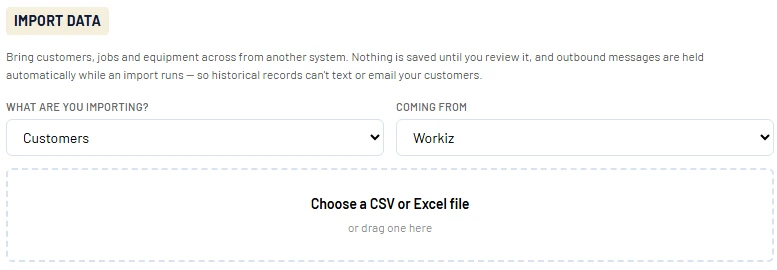
Export from your old app, choose where it came from, and drop in the file. Servorio walks you through each step.
- What comes across: customers, jobs, technicians, equipment, invoices and payments
- From: Jobber, Housecall Pro, ServiceTitan, Workiz, or any spreadsheet (CSV or Excel)
- Nothing is saved until you review it
- No surprise messages: texts and emails are held while an import runs, so old records can't contact your customers
- Changed your mind? Undo an import in one click
2
Your customers call the same number.
Keep your phone number
Your customers call the same number.
It rings in Servorio.
Calls in Servorio run on your own Twilio account, so the number belongs to your business, not to us.
- Already on Twilio? Connect your account in Settings, Phone and L.I.S.A, and you're done.
- Number with another phone company? Transfer (port) it to Twilio. Your number keeps working with your current company until the transfer is complete, so you don't miss calls.
- Caller details on screen the moment the phone rings, and L.I.S.A ready to get the booking ready.
- Recording notice played before each call connects, in your own words.
- If you ever leave, the number stays in your Twilio account. Nothing to transfer back.

3
Tap, pay, done.
Card terminals and payments
Tap, pay, done.
The invoice marks itself paid.
Servorio Payments, powered by Stripe, lets you take Visa and Mastercard on every invoice, in the field or in the office.
- Connect your card readers: add the Stripe readers on your account to Servorio and assign each one to a branch
- Paid on the terminal, paid in Servorio: no one marks invoices paid by hand
- Payment links when the customer isn't there
- You control manual card entry: allow techs to key in cards, or limit them to the terminal and payment links
- Cash, e-transfer and cheque are still recorded the normal way
- Balances, payouts and bank details on one screen. Stripe's processing fees are deducted before each payout.
